ProZ.com frequently asked questionsTerminology/term help Main Main
1 - Terminology/term help 2 - KudoZ
2.1 - KudoZ: general 1.1 - Ano ang KudoZ? Ang KudoZ ay isang network sa pagtulong sa pagsalin ng katawagan. Sa pamamagitan ng KudoZ, ang mga tagagamit ng ProZ.com at mga dumadalo ay nag-aalok sa isa't-isa ng tulong sa pagsalin ng mga mahihirap na katawagan nang walang bayad. Tingnan ang aming pagpapakilala sa flash upang higit na maunawaan. 1.2 - Glossary of KudoZ terms
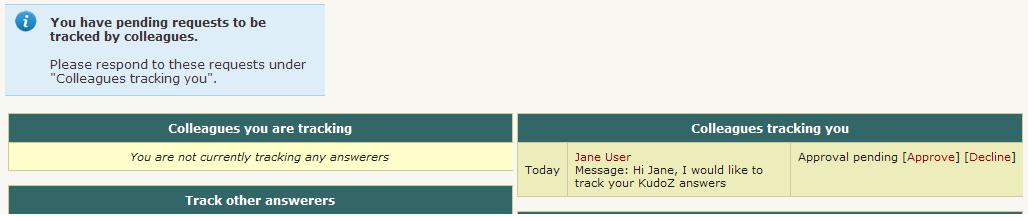
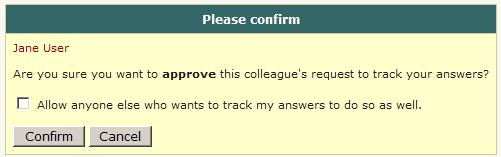
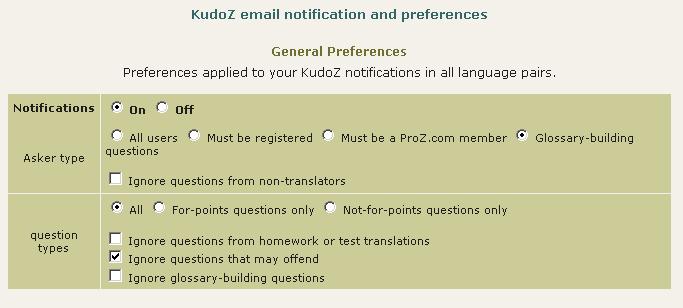
1.3 - Paano ito gumagana? Ang isang 'transaksyong' KudoZ ay nabubuo ng tatlong hakbang: 1.4 - Ano ang kapakinabangan ng mga puntong KudoZ? Ginagamit ng ilang mga kliyente ang mga puntong KudoZ bilang tanda sa karagdagang pagsuri ng mga tagasalin. Ang pangangatuwiran ay, na kung nangangailangan ng serbisyo ng tagasaling nakakaunawa sa panggagamot, ang taong nakakuha ng 300 punto sa mga tanong tungkol sa panggagamot ay malamang na mabuting simula sa paghahanap. 1.5 - PAGSAGOT: Paano isinasagawa ang update ng puntong KudoZ? Ang ipinakitang mga kabuuan ng puntong KudoZ sa ilang lugar sa site ay ina-update isang beses araw-araw, habang ang nakikita sa ibang lugar ay ina-update sa totoong panahon. Kaya maaaring magkaroon ng mga pansamantalang pagkakaiba, subalit winawasto ito kapag binilang ang lahat ng mga punto nang isang beses bawat araw. 1.6 - Do I earn any KudoZ points by answering KudoZ questions? No. KudoZ points are only earned if one of your answer to any KudoZ question is selected by the asker or automatically by the system based on peer agreement. 1.7 - Ano ang mga patakaran ng paglahok sa KudoZ? Tingnan ang mga patakaran ng KudoZ: Mga pangmalawakang patakaran, Mga patakaran sa pagtanong at Mga patakaran sa pagsagot at pagbigay ng komentaryo sa kasama 1.8 - Can friends, family members or close associates participate in my KudoZ questions or answers? Participation in KudoZ questions, particularly using the peer comment system to "boost" an answer, or in asking and answering to gain KudoZ points, should not be carried out among the profiles of friends, family or close associates, in order to maintain a certain level of transparency in the KudoZ arena. In cases where interacting profiles are shown to be of this type, a mutual block may be applied to the profiles (this blocks the interaction between specific profiles only, not participation in KudoZ at large) to ensure fairness. 1.9 - PAGSAGOT: Ano ang dapat kong gawin kapag nalalabag ang mga patakaran ng KudoZ? Kapag nalalabag ang Mga patakaran ng KudoZ, dapat mong tawagin ang pansin ng tagapamagitan sa tambal ng wikang natutukoy sa paksa. Magagamit mo ang Talaan ng mga Tagapamahagi. 1.10 - Ano ang pangangatuwirang ginamit sa mga kategorya ng KudoZ? Maaaring uriin ang mga tanong sa KudoZ sa pamamagitan ng isang listahan na mahigit-kumulang 100 uri ang nilalaman. Ang listahan, na ibinatay sa estadistika ng mga paksang nasasakop na ipinasok sa malayang teksto ng mga tagagamit ng ProZ.com, ay sadyang di-gaanong malinaw. Halimbawa, dahilan na ang isang kasapi ay maaaring mag-isip ng "awto" habang ang iba ay nag-iisip ng "kotse", ang dalawang pangalan ng kategorya ay inilalaan sa listahan. 1.11 - Ano ang mangyayari kung hindi namarkahan ang isang tanong? Kung ang isang tanong ay nakatanggap ng mga sagot ngunit hingi naisara sa loob ng tatlong araw, magpapadala ng paalalang magmarka sa tagatanong sa pamamagitan ng email. Kung manatiling bukas ang tanong pagkalipas ng apat ng mga naturang paalala (sa panahon ng 2 linggo), tatangkaing piliin ang pinakamahusay na sagot sa pamamagitang awtomatiko. Pipiliin ito ng isang 'autograding robot' ayon sa sumusunod na mga patakaran, batay sa bilang ng netong pagsang-ayong natanggap ng bawat sagot: 1.12 - Are askers able to close a question without awarding points? Yes. An asker may choose to do this when s/he has asked a question in error (misspelled term, etc.), when no answer was deemed helpful, when a better term was found elsewhere (and no answer was deemed helpful), or in other cases. 1.13 - How often do askers close questions without awarding points? Less than 5% of the time. 1.14 - Saan ko mahahanap ang talaan ng aking mga nakaraang tanong at sagot? Magtungo sa iyong profile at mag-click sa tab ng KudoZ. Makikita din ng mga kasapi ang opsyon upang maipilit itong mag-update ng kanilang mga puntong KudoZ. 1.15 - Can I see questions in language pairs not reported in my profile? Yes. You can see KudoZ questions in all language pairs by clicking on See more languages in the KudoZ questions page. 1.16 - Sa aling mga kalagayan maaalis ang isang katanungang KudoZ? Mayroong sampung maaaring maging dahilan upang maalis ("squash") ang isang tanong sa KudoZ. Upang makita ang pagtatalakay sa mga dahilan, tingnan ang: artikulong ito. 1.17 - What information can I see about a KudoZ asker? If you move your mouse over the asker's picture in a KudoZ question you will see a mouse-over message similar to the one pictured below: 1.18 - Ano ang ginagawa ng pindutang "Ibotong PRO" o "Ibotong di-PRO"? Ang mga tanong sa KudoZ na namarkahang PRO ay maboboto ng mga lumalahok na gawing di-PRO, at gayundin sa kabaligtaran. Nangangailangan ng tatlong boto upang palitan ang uri ng tanong. 1.19 - When posting my question I selected by mistake the wrong level (PRO, non-PRO). What can I do? You should submit a support request to have this issue addressed by staff. 1.20 - PAGSAGOT: Sa palagay ko, dapat tumaas ang kabuuan ng aking mga punto ngayon. Kung ikaw ay kasapi, maaari mong pilitin ang sistemang mag-update ng iyong mga punto sa totoong panahon. Magtungo sa pahina ng kabuuran ng iyong mga puntong KudoZ at mag-click sa "Mag-update ng kabuuan ng punto ngayon". Kung ikaw ay isang nakarehistrong tagagamit, ang anumang pagkakaiba sa kabuuan ng iyong punto ay malamang mawawasto sa loob ng 24 na oras. 1.21 - PAGSAGOT: Bumagsak ang isa sa aking mga kabuuan ng puntong KudoZ. Paano nangyari ito? Maaring bumaba ang ilang napiling kabuuan ng punto (pangkalahatan, PRO, ayon sa larangan o ayon sa panahon). Ang maaaring sanhi nito: 1.22 - PAGSAGOT: Paano ko mababago ang lumilitaw sa kabuuran ng aking mga puntong KudoZ sa aking profile? Maaaring piliing itago mga tagagamit ang ilang natitiyak na uri ng mga puntong KudoZ mula sa kabuuran sa pamamagitan ng pahinang ito: http://www.proz.com/pro/?show_mode=kudoz&sub_mode=summary 1.23 - What do the "ok" and "no" under the the "Gloss" (glossary) column in my KudoZ activity section indicate?
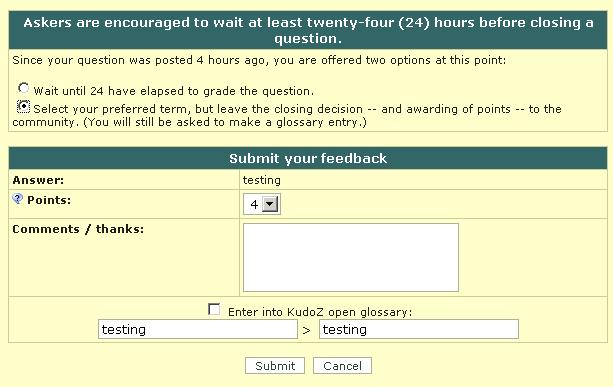
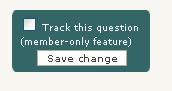
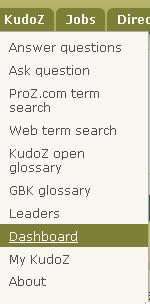
1.24 - PAGSAGOT: Kailangan kong lumikha ng bagong profile. Maaari ko bang pagsama-samahin ang aking mga punto sa nakaraang profile? Oo, kung ikaw ay kasapi, magagawa ito para sa iyo ng tauhang alalay. Tandaang hindi lamang ang iyong mga punto, ngunit lahat ng iyong kasaysayan sa KudoZ (mga tanong, komentaryo bilang kasamahan, puna, atbp) ay maaring ilipat. Mawawalan ka ng akseso sa lumang profile. 1.25 - Paano ko maiiwasan ang pag-transliterate ng mga tuldik at titik na tinuldikan sa paghahanap ng katawagan sa ProZ.com? Sa ilang kaso, ang Paghahanap ng katawagan sa ProZ.com ay naglalaan ng limitadong kakayahang mag-transliterate ng mga tuldik at titik na tinuldikan (halimbawa, ang paghahanap sa katagang "publica" ay maaring magsauli ng kinalabasang naglalaman din ng "pública"). Upang hadlangan ang katangiang ito, piliin ang opsyong "itugma sa natitiyak na parirala". 1.26 - How can I enter a discussion entry? To enter a discussion entry you should click on the "Post discussion" button. A form will show to allow you to post a title and the body of your entry. These fields are limited to 50 and 1200 characters respectively (there is a counter to tell you how many characters you have left for the main field). There is a preview option and buttons for submitting the entry and for canceling the operation. 1.27 - Iminumungkahi kong gawing bayaran ang paglalahok sa KudoZ. Makakabuti ito sa kalidad. Wala kaming kasalukuyang balak higpitan ang paggamit ng KudoZ sa mga kasapi. Gayunman, inilalaan ang opsyon upang magtakda ng mga pagkiling sa pananaw at abiso upang makita lamang ang mga tanong mula sa kasapi. Gayundin, kapag nagtanong ka, maaari mong ipahiwatig na nais mong makatanggap ng sagot sa mga kasapi. 1.28 - Are KudoZ questions indexed by search engines? Yes. As with the public forums, KudoZ questions are indexed by search engines. 1.29 - What do the time references next to the confidence level and in the peer section indicate? They indicate the time elapsed from the moment the question was asked until the other action "answer", "peer comment" took place. The times shown are measured in relation to moment the question was asked. 1.30 - Can the asker enter in the glossary a term different from the one suggested in the selected question? Yes. Points are (or should be) given to the most helpful answer, while the best possible term should be entered in the glossary, even if it was not suggested by the answerer who won the points. 1.31 - A user in my sub-community regularly posts bad answers and they are sometimes selected and I am concerned that the glossary will deteriorate. Many valuable colleagues are of the same opinion and several of them have abandoned KudoZ. What can be done? The system includes the "disagree" feature. If answers considered invalid receive several disagrees based on linguistic (not personal) comments, then the amount of "bad" answers is likely to be reduced. 1.32 - I was the first to provide the right answer to a KudoZ question and then other user provided the same answer adding few more explanations and received the points (instead of agreeing to my answer). Is this allowed? Askers have the right to select the answers they consider most helpful to their questions. 1.33 - How does the first validated answer mode work? Askers have the option of asking questions in "first validated answer" (FVA) mode. When the FVA option is selected, instead of multiple answers being submitted and the asker selecting the one that is most helpful, the goal is for one correct translation to be agreed upon by the answerer community. An FVA question is therefore considered closed as soon as one answer gets two net agrees (in top pairs, two net agrees must come from users who meet the criteria for the question). 1.34 - What are AI-generated KudoZ answers? AI-generated KudoZ answers are automatic answers generated by AI technology, in this case, by ChatGPT. This answers are marked as such within the answer itself. 1.35 - How are AI KudoZ answers generated? Most AI technology brings information back by means of prompts. Think of prompts like instructions you give to the AI. When you ask a question or tell it something, that's your prompt. In order to generate a KudoZ answer, we send ChatGPT three different prompts: one to get a proposed translation of the source term taking into account the information supplied by the asker (languages, fields, contect), one to obtain an explanation of the proposed translation that also includes sample sentences, and a last one to get confidence level information (i.e. to know how confident the AI feels about its proposed translation). Once this information is returned by the AI, a KudoZ answer is automatically built with it and posted together with the question (provided the asker has selected the AI-generated answer option). 1.36 - Who posts AI-generated answers? AI answers are generated and posted automatically when an askers select this option in the KudoZ question form: 1.37 - Are askers notified of AI-generated answers to their questions? No. For the time being, no email notification is sent for AI-generated answers. 1.38 - Can KudoZ participants peer grade AI-generated answers? Yes, KudoZ participants are encouraged to agree or disagree (or remain neutral) with AI-generated KudoZ answers. Peer grades will count in the case of automatic grading. Click here for details about automatic grading. 1.39 - Can KudoZ askers select AI-generated answers as the most helpful and award points to the AI? Yes, KudoZ askers can select an AI-generated answer as the most helpful one and award KudoZ points to the AI. These KudoZ points, however, will not be used to rank the AI profile in the directory. Click here to learn how KudoZ points count for directory ranking. 1.40 - Do KudoZ points “earned” by the AI count for directory ranking? No. KudoZ points awarded to the AI for KudoZ answers selected as the most helpful will not count for directory placement. 1.41 - What is the purpose of adding AI to KudoZ? The integration of AI into term help is thought as a supporting feature. If AI technology is available out there and language professionals are using it (in many different ways), why not include it in KudoZ and enable them to realize their full potential? ProZ.com provides tools and opportunities to its members. This is just another one of many. Click here to see a full list of membership benefits. 2.2 - Asking 2.1 - Ano ang bumubuo ng "tulong sa katawagan" na tinukoy sa patakarang http://www.proz.com/siterules/kudoz_general/1.1#1.1 ? Maaaring magamit ang mga katanungang KudoZ upang humiling ng tulong sa mga katawagan o kawikaan. 2.2 - What is the meaning of "one term is allowed per question" in KudoZ rule 2.1? Unless they share a root or are otherwise related, terms should be posted separately--an asker should not ask how to say "apple" and "banana" in the same question. This means that a question such as "flotsam/jetsam/derelict" in a context of maritime law would be not valid, since the terms are independent and should posted in three separate questions. On the other hand, "the flotsam and jetsam of the inner city" would be OK, as the terms flotsam and jetsam are related in a unit of meaning. Other examples of valid KudoZ questions are: "screen / screening" (they share a root), "Many levels in this game were heavily tuned for smoothness" (terms related as a unit of meaning in a particular context). 2.3 - PAGTANONG: Mayroon bang limitasyon sa bilang ng mga tanong na maaari kong tanungin? Oo. Ang iyong pang-araw-araw na limitasyon (sa loob ng kapanahunan ng 24 oras) ay binabatay sa antas ng iyong pagsapi. Kung hindi ka nakarehistro sa ProZ.com, maaari kang magpadala ng (1) tanong bawat araw. Kung nakarehistro ka ngunit hindi kasapi, maaari kang magpadala ng lima (5). Kung ikaw ay kasapi, maaari kang magtanong ng labing-lima (15). Mayroon ding mga limitasyon bawat linggo: 20 mga tanong sa nakarehistrong di-kasapi at 60 mga tanong sa mga kasapi. Kung mayroon kang sampung (10) tanong na nakatanggap ng mga sagot na mabisa at nakabukas ang mga ito nang higit sa isang linggo, hindi ka mapapayagang magpadala ng karagdagang mga tanong. Mangyaring markahan at isara ang mga tanong na ito upang makapagpatuloy sa pagtanong. 2.4 - What happens if I ask questions beyond the daily or weekly limits? When you ask questions beyond the limits corresponding to your membership status, these extra questions are added to the KudoZ question queue and they will be made visible automatically when enough time has elapsed for the question to be within asking limits. 2.5 - PAGTANONG: Ugali kong imbakin ang aking mga tanong sa katawagan hanggang matapos ang proyekto. Mayroon bang paraang maiiwasan ko ang limitasyon? Ipinapalagay namin na ang limitasyon sa labing-lima (15) araw-araw ay sapat na sa nakararami. Sa pamamahagi ng iyong mga tanong sa huling dalawang araw ng proyekto, halimbawa, maaaring humiling ka ng tatlumpu (30). Kung kailangan mo ng karagdagan at ikaw ay isang kasapi, maaari mong hilingin sa Tauhang Umaalalay na bigyan ka ng pansamantalang pahintulot. 2.6 - Can I post a question in more than one language pair? It is not possible to post a single question in different language pairs. However, several questions in different language pairs may be posted for a single term. 2.7 - PAGTANONG: Maaari ba akong magpaskil ng tanong sa isang wika lamang? Oo, subalit walang isang tiyak na seksyon sa Kudoz. Ang dapat mong gawin, kung nais mong magpaskil ng isang tanong sa isang wika lamang (hal. Ingles sa Ingles) ay magtungo sa Magtanong sa tab ng Kudoz. Pagkatapos, sa pormularyo, mag-click sa 'Tingnan ang karagdagang mga wika'. Makakakita ka ng dalawang listahan kung saan mo mapipili ang wikang ninanais sa dalawang panig. Sa ganitong paraan, ito ay magiging tanong sa nag-iisang wika. 2.8 - PAGTANONG: Hindi ako nakakasiguro kung maiuuri ang isang tanong bilang di-PRO o PRO. Ano ang pagkakaiba? Bagaman walang paraan upang makatakda ng malinaw na linya, ang mga sumusunod na tularan ang pinapairal sa dalawang uri ng tanong:
Kapag pinairal ang mga tularan sa itaas, ihiwalay ang iyong sarili sa sariling karanasan/pagdadalubhasa at mag-isip ng isang katha-kathang taong nagsasalita ng dalawang wika na napili sa sapalaran. Masasalin ba nito nang mabuti ang katawagan o pariralang tinatanong (sa natitiyak na paggamit na ipinakita) sa unang tingin? Kung hindi, hindi ito katanungang PRO. Mayroong isang artikulo na tumatalakay nito nang higit na madetalye. 2.9 - What should I do if I don't have context to include in my KudoZ question? There is always some context to provide, such as information about the type of customer (an oil company? a plumber? a dentist? ), the type of document you are translating, the subject, etc. 2.10 - PAGTANONG: Maaari ba akong magdagdag ng impormasyon sa aking tanong? Maaari ko bang i-edit ito? Hindi ka maaaring mag-edit ng tanong, subalit maaari kang magdagdag ng mga puna. May pormularyong lilitaw sa pahina ng tanong. (Kung hindi mo masubaybayan ang isang tanong, hanapin ang link sa email ng pagpapatibay.) 2.11 - Can KudoZ askers direct their questions to specific site users? Yes. When posting a KudoZ question, askers are given the option to restrict their KudoZ questions by 1) profile information (native language, language pair and field) and 2) membership status. If the asker selects the option "Only ProZ.com members may answer" when posting his/her question, the "Answer" button will not be visible to non-members and the following message will show to them: 2.12 - PAGTANONG: Maaari ko bang ipadala ang aking tanong sa natitiyak na mga taong kilala ko? Maaari mong gawin ito kung ikaw ay (nagbabayad na) kasapi ng ProZ.com. 2.13 - PAGTANONG: Bakit ako magtatakda ng hangganan sa tanong sa natitiyak na mga tao? Nalaman na ng maraming mga tagasagot sa KudoZ kung alin sa mga kasapi ng ProZ.com ang dalubhasa sa aling mga larangan. Sa ilang natutukoy na katawagan, pinipili nilang sumangguni nang direkta sa mga ekspertong ito. Ang paggawa nito sa pamamagitan ng KudoZ ay makakataas sa pamantayan at makakaluwag sa pamamaraan, at makakatiyak ng pagpapanatili ng isang talaang ng mga pagsaling inalok na maaaring gamitin sa paghahanap. 2.14 - PAGTANONG: Bakit ako magtatakda ng hangganan sa akseso sa isang tanong para sa natitiyak na mga uri ng kasapi? Paminsan-minsan, ninanais ng mga tagatanong ang pagtugon ng mga natitiyak na pangkat, tulad ng mga katutubong nagsasalita ng wika, mga natatrabaho sa isang larangan, o iba pang napiling mga uri ng kasapi ng ProZ.com. Linalaan ang pamamaraan upang mapaglingkuran ang mga kagustuhang ito. 2.15 - PAGTANONG: Kung magtanong ako nang pribado, hal., sa pamamagitan ng pagtakda sa isa sa aking mga pangkat, lilitaw ba ito sa iba? Mahahanap ba ito sa mga salansan? Kung ikaw ay kasapi, maaari kang magpasyang panatilihing pribado ang katawagan nang palagian. Kung ikaw ay nakarehistrong tagagamit, maaari kang magpasyang panatilihing pribado ang katawagan nang isang buwan. Matapos nito ay magiging pangmadla ito at mahahanap. 2.16 - I see a "squash" button under a KudoZ question I have posted, what does that mean? If you have posted a KudoZ term help question and it has not received an answer, you will have the option to "squash" or remove the question until it receives at least one answer. This allows users to remove mistakenly-posted questions without the assistance of a moderator or KudoZ editor. 2.17 - PAGTANONG: Paano ko mapapasalamatan ang mga tagasagot ng KudoZ kapag wala akong pagtanggi o hindi ko pa binibigyan ng grado? Maaari kang mag-click sa pangalan ng tao at magsulat sa kanila sa pamamagitan ng profile. Ito ay sanhi ng pagpapadala ng isang email. 2.18 - PAGTANONG: Paano ko mamarkahan ang aking tanong sa KudoZ? Upang mamarkahan ang iyong tanong sa KudoZ, dapat kang mag-click sa link na pinamagatang "Piliin itong sagot bilang pinakamainam na nakatulong" sa loob ng kahon ng sagot na pinakakapaki-pakinabang. Kapag nag-click ka sa link na "Piliin itong sagot bilang pinakamainam na nakatulong" , lilitaw ang isang bintana upang payagan kang magbigay ng mga puntong KudoZ at magpasok ng katawagang KudoZ sa iyong talahulugan, sa Bukas na Talahulugan ng KudoZ (KOG), o sa dalawa. 2.19 - I did not enter the term to the KOG at the time I graded my question, but I would like to enter it now. How can I do that? Simply click on the "gloss" button below the "Summary of answers provided" chart. 2.20 - Can I grade my question less than 24 hours after posting it? KudoZ rule 2.10 recommends that askers allow at least twenty-four (24) hours to pass before closing a question. 2.21 - PAGTANONG: Nawala ko ang link sa email ng pagpapatibay ng KudoZ. Paano ko mamamarkahan ngayon ang aking tanong sa KudoZ? Kung nawala mo ang link sa email ng pagpapatibay ng KudoZ, maaari kang makuha ng kopya sa pakikitungo sa tauhang alalay o sa pamamagitan ng sistema sa pagkuha ng ticket online at/o maaari kang makitungo sa isang tagapamagitan upang maipadala nila muli ang link sa iyong email address. Tandaan na mahalaga ang pagpapadala ng KudoZ URL ng iyong tanong kapag humihiling muli ng email ng pagpapatibay. 2.22 - PAGTANONG: Maaari ba akong magbigay ng punto sa higit sa isang sagot? Hindi, maaari ka lamang mamili ng isang sagot na "pinakamainam na nakatulong". Ang pagbabahagi ng punto sa mga tagasagot ay napag-isipan na noon, subalit hindi natanggap dahilan sa maliit na maibubuti, sa hirap ng pagsasagawa ng pagbabahagi ng punto, at iba pang suliranin tulad ng pagbabahagi ng apat na punto sa tatlong sagot. Isang mabisang patakaran sa mga kaso kung saan mahirap pasyahan ang sagot ay ang pagpili ng sagot na pinakamainam na nakatulong. Sa kaso ng dalawa o higit pang sagot na parehong nakatulong, maaari mong piliin ang nauna (sa panahon ay napapatag ang mga pagkakaiba.) 2.23 - Nagsara ako ng isang tanong na hindi pumili ng pinakamahusay na sagot. Maaari ko bang buksang muli ang tanong ngayon? Oo. Mag-click lamang sa pindutan ng BUKSAN. Kung sakaling may alinlangan, kumuha ng tiket sa Alalay. 2.24 - PAGTANONG: Paano ko masasarahan ang isang tanong sa KudoZ na naipaskil ko na at hindi pa nasasagot? Sa pahina ng iyong tanong, mag-click sa pindutan ng 'Markahan'. Dadalhin ka nito sa susunod na pahina, kung saan ka dapat na mag-click sa pindutang 'Isara nang walang marka'. (kredito: Mikhail Kropotov) 2.25 - PAGTANONG: Paano ko matitigilan ang pagtanggap ng mga paalalang email upang markahan ang aking mga tanong? Napapadalhan ang mga tagatanong ng mga paalalang email upang markahan ang bukas na mga katanungang KudoZ na may mabisang sagot makalipas ang 5, 7, 9, at 11 araw matapos ang araw na naipaskil ang tanong. 2.26 - Ano ang panuntunan sa dami ng punto (1-4) na dapat kong ibigay sa napiling sagot? Kapag nagpapasya sa bilang ng puntong ibibigay, ituring lamang itong iskala bilang panuntunan: 2.27 - Points were awarded to an answer to my question but I would like to select another answer instead. How can I un-grade my question? To un-grade a question you have asked in order to award the points to the answer you found most helpful, you will need to first obtain the agreement of the answerer to whom the points have been given. Both you and the answerer should express this agreement either to the assigned moderator(s), or via support request. 2.28 - I have included confidential information in a question. Can I have it removed? If you posted a KudoZ question that contains confidential information, please submit a support request, specifying the exact information you would like to have remove so that staff can remove this information for you. 2.3 - Answering 3.1 - PAGSAGOT: Hindi ko makita ng isang tanong sa KudoZ. Ano ang dapat kong gawin? Mangyaring ipadala ang URL, kasama na ang screenshot ng pahina, sa Alalay sa ProZ.com! 3.2 - PAGSAGOT: Kapag naghahanap ako ng mga tanong mula sa mga kasapi lamang, may napapansin akong kakaiba. Ang opsyong kasapi-lamang (magagamit sa ilalim ng "uri ng tagatanong" sa pahina ng listahang KudoZ - http://www.proz.com/kudoz ) ay sasalain ang mga tanong at ipapakita lamang sa iyo ang mga natanong ng mga tagagamit na kasapi *noong nagtanong sila*. Dahilan sa kamakailan lamang na pagtatala sa uri ng pagsapi, ang bilang ng mga kinalabasan ay kaunti lamang. Gayundin, ang pagkakaroon ng iba't ibang mga uri ng pagsapi (buo, bahagi), at ang paglipas ng ilang pagsapi ay maaaring magbigay ng impresyon na may pagkukulang. 3.3 - Kung nasara na ang tanong at nagbigay na ng mga punto, maaari ko pa rin bang sagutin ito? Kapag nagbigay na ng mga punto, sarado na ang tanong, ngunit kahit na nakasara ay maaari mong sagutin ito. 3.4 - PAGSAGOT: Maaari ko bang i-edit ang naibigay kong sagot sa isang tanong sa KudoZ? Hindi. Ang pag-edit ng isang sagot ay hindi makatarungan sa iba pang mga tagasagot. Maaaring maisipan mong magdagdag ng komentaryo sa iyong sagot. Sa ilang kaso, maaaring itago ng tagasagot ang isang maling sagot at magpaskil ng tamang sagot sa lugar nito. 3.5 - PAGSAGOT: Bakit lumilitaw ang salitang "Itago" sa kahon ng aking mga sagot? Pinapahitulutan kang itago ang sariling mga sagot. Ito ay paraan upang bawiin ang mga sagot. 3.6 - PAGSAGOT: Paano ko mapapakita ang isang sagot na itinago ko? Ang mga sagot na itinago ay hindi maaaring mapakita muli. Dapat mo lamang gamitin ang link na "Itago ang sagot" kung nais mong itago ang iyong sagot nang permanente. 3.7 - PAGSAGOT: Kapag itago ko ang aking sagot at magbigay ako ng panibago, labag ba ito sa mga patakaran ng site sa pagsagot? Tulad ng pagpapadala ng higit sa isang sagot, ito ay maaaring tanggapin kapag minsan lamang mangyari. Ang palagiang pag-aalok ng maraming pagsalin, matago o hindi ang mga nauunang sagot, ay labag sa mga patakaran ng site sa pagsagot sa KudoZ. Tingnan ang mga patakaran sa pagsagot ng KudoZ. 3.8 - Will my hidden answers be visible in my list of answers? You will always be able to see the answers you have hidden in your list of KudoZ answers. Other users will only see your hidden answers if you have hidden 10% or more of your total answers (but no less than 20 answers). 3.9 - What is the meaning of "no more than one answer per question" in KudoZ rule 3.1? Submitting an answer to a KudoZ question and then submitting one or more additional answers to the same question is discouraged (even if the original answer was hidden) and doing this in a systematic way is forbidden by the rules. Answerers can add as many comments as they want to their answers. Offering several terms together in the same answer (ANSWER1/ANSWER2/ANSWER3) is not forbidden, but discouraged, as it interferes with the glossary format. 3.10 - PAGSAGOT: Ano ang ibig sabihin kapag ang isang tanong ay natatakang "Walang punto"? Ipinapapalagay ng ilang mga tagagamit na ang pagbibigay ng mga puntong KudoZ ay nakakasira sa karanasan ng KudoZ. Pinapahintulutan ang mga naturang tagagamit na magpaskil ng tanong na "walang punto" kapag nagtatanong. Hindi maaaring magkamit ng mga puntong KudoZ sa pagsagot sa naturang mga tanong. 3.11 - PAGSAGOT: Kung sumagot ako sa mga tanong na "walang punto", lilitaw ba ang mga ito sa kasaysayan ng KudoZ sa aking profile? Oo. Ang mga naturang tanong ay matatakan ng kulay na nagpapahiwatig na walang maaaring puntong ibigay. 3.12 - PAGSAGOT: Nakakabuti ba sa akong posisyon sa talaan ng namumuno sa KudoZ o sa talaan ng mga tagasalin ng ProZ.com ang pagsagot sa mga tanong na "walang punto"? Hindi. Ang mga ikabubuti ng pagsagot sa mga tanong na "walang punto" ay hindi tekniko at hindi direkto (pagtuturo, pagtulong, pakikipag-network, atbp.) 3.13 - What does Confidence level show? Confidence level is the degree of certainty expressed by an answerer regarding his or her own answer. This information is provided by an answerer in the Kudoz Answer form. Confidence level is a required field and an answerer is suggested to select one of the 5 (five) possible confidence levels: 3.14 - I don't know the answer to a KudoZ question, but I have some information that could help the asker. Where should I post this information? If you cannot think of an appropriate answer to a KudoZ question, but you have information that may help the asker or other participants to come up with a good translation, make a reference post by clicking on "Post reference" and include such relevant information. 3.15 - I do not see the "Post reference" button in a KudoZ question. Why? Once you posted a Kudoz answer, you will not be able to post a reference. It is assumed that you put all the information in your Kudoz answer. This makes your answer a more useful resource, and ensures all the information is kept in one place. 3.16 - Under what conditions can an answerer use the discussion entries feature? Answerers can use the discussion entry to ask the asker for context information or to engage in linguistic discussions of some points of the question asked. In general, opinions on other answers should be provided in the peer grading interface while additional comments supporting their answers should be presented as comments in the answers themselves. Systematic use of the discussion entry to promote an answer provided will not be allowed. 3.17 - How can I avoid answering questions from askers who tend to close their questions without grading them? You can see how many questions an asker has closed without grading by mousing over their name in a KudoZ question they have asked. (There is also an option to filter out questions from certain askers in the lists of questions.) 3.18 - 2.4 - Peer commenting 4.1 - PAGSAGOT: Maaari ba akong sumang-ayon sa higit sa isang sagot sa isang tanong? Oo. Hinihikayat kang sumang-ayon sa lahat ng mga sagot na tinuturong mong tama, at hindi sumang-ayon sa lahat ng mga sagot na tinuturing mong mali. 4.2 - PAGSAGOT: Ano ang mangyayari matapos magpahiwatig ang isang tao na di-sang-ayon siya sa isang sagot? Ang hindi pagsang-ayon ay hudyat lamang sa nagtatanong ng sa palagay mo (at maaaring sa palagay ng ibang tao) ay hindi tama ang sagot. Maaaring tanggapin o hindi tanggapin ng tagatanong ang mungkahi. 4.3 - PAGSAGOT: Nagpasok ako ng komentaryo sa kasama at nais kong tumugon sa sagot na nakuha ko. Maaari ko bang gawin ito? Hindi. Upang maiwasan ang paglihis ng mga KudoZ thread, hindi pinapayagan ang maramihang pakikipagpalitan sa paligid ng bawat sagot. Maaaring magbigay ng komentaryo ang isang kasama at maaaring tumugon ang tagasagot--dito natatapos ang pagkikipagpalitan. (Ang kakayahang mag-edit ng komentaryo at ng pagtugon dito ay inilaan lamang sa hangarin ng pagwawasto ng pagbaybay, mga naputol na link, o paggawa ng ganitong uring pagbabago.) Tiyaking malinaw at payak ang iyong pangangatuwiran; iisa lamang ang iyong pagkakataon. 4.4 - Nakakita ako ng isang link upang "i-edit /tanggalin" ang aking komentaryo bilang kasamahan. Ano ang layunin nito? Ang link ng "i-edit/tanggalin" ay binibigyan ka ng kakayahang mag-edit ng iyong komentaryo bilang kasamahan. Tandaan lamang na ang kakayahang ito ay binibigay lamang upang mag-edit ng pagbaybay, magwasto ng mga naputol na link, o sa magsagawa ng katulad na mga pagbabago. 4.5 - Can I comment on an answerer's confidence level in my peer comment? No. Peer comments should be purely linguistic in nature (see KudoZ rule 3.5). Making comments or insinuations regarding an answerer's confidence level would not be in line with KudoZ rule 3.7. 2.5 - KudoZ editors 5.1 - PAGSAGOT: Nakakakita ako ng ilang mga tagagamit (hindi tagapamagitan) na nagbabago ng pag-uri o nag-aalis ng ibang mga tanong. Paano napili ang mga kasaping ito? Ang mga tagapamatigan ay maaaring mag-anyaya ng mga kasapi/nakarehistrong tagagamit na mayroong hindi bababa sa 500 puntong KudoZ upang basahin ang mga patakaran sa pag-uri at pagtanggal, at gumawa ng maikling pagsubok. Ang mga pumasa ay may karapatang mag-edit ng tanong sa ganitong paraan. 5.2 - Is site moderation one of the responsibilities of KudoZ editors? No. KudoZ editors are site users who have been given the right to perform some editing functions on KudoZ questions, namely the change or reversion of KudoZ question language pairs, the removal of questions if these are not in line with site rules or if they are duplicated, and the change of KudoZ question fields. 5.3 - PAGSAGOT: Lumitaw ang isang opsyong pinapayagan akong mag-edit sa mga tanong ng ibang mga tao. Bakit? Kapag naabot mo ang isang natitiyak na bilang ng mga puntong KudoZ (500), ang ilang opsyon ay lilitaw para sa pagwawasto sa mga tanong na naipaskil ng mga iba. Kung dapat ang isang katanungan ay Espanyol patungo sa Ingles ngunit natala bilang Ingles patungo sa Espanyol, magpatuloy lamang at gawin ang pagwawasto. 5.4 - I would like to apply to become a KudoZ editor. Can I? No, it is not possible to submit an application to become a KudoZ editor, an invitation has to be issued by a moderator or site staff. 5.5 - Can KudoZ editors reclassify a question form PRO into non-PRO and vice versa? No, KudoZ editors and moderators will have to vote like any other member for the change of status of questions (instead of forcing this change of status.) 5.6 - Does membership determine someone's eligibility to become a KudoZ editor? No, eligibility is not determined by membership status. 2.6 - KudoZ notifications 6.1 - PAGSAGOT: Hindi ako nakakakuha ng anumang abisong email sa KudoZ. Kung hindi ka nakakakuha ng anumang abisong email sa KudoZ, at hindi ka nakatanggap ng mga ito kailanman, suriin ang mga setting ng iyong profile. Hindi ka makakakuha ng anumang abiso kapag: 6.2 - PAGSAGOT: Hindi ko nakukuha ng lahat ng mga abisong KudoZ na dapat kong makuha. Sa pagbabalita tungkol sa mga katanungang KudoZ sa pamamagitan ng email, ang mga pamantayang pinagbabatayan ay: tambal ng wika, paksang nasasakop, at antas ng kahirapan. Kung hindi ka nakatanggap ng abisong email sa isang tanong, tiyakin na ang iyong mga setting at opsyon sa profile ay nagpapahitulot na makatanggap ka nito. Kung naniniwala ka na ito ang kaso, mangyaring magpadala ng isang paghiling sa alalay, kabilang na ang (mga) URL ng isa o higit pang katanungang KudoZ na dapat nakatanggap ka ng abiso. Susuriin ito ng tauhan ng ProZ.com upang makita kung napadala o hindi ang email ng mga server ng ProZ.com. (Kung napadala nga, maaaring mayroong problema o pagsasala na isinasagawa ng iyong ISP o ng iyong lokal na computer.) 6.3 - PAGSAGOT: Tumatanggap ako ng napakaramimg abisong email sa KudoZ Upang mabawasan ang dami ng abisong email sa KudoZ na natatanggap, subukang pumili nang higit na kaunting larangan sa iyong Opsyon sa abisong KudoZ. Upang matigil ang pagtanggap ng abisong email sa KudoZ nang tuluyan, piliin lamang ang opsyong 'Hindi' sa unang tanong sa KudoZ Dashboard. 6.4 - PAGSAGOT: Minsan nakakatanggap ako ng tanong sa email na hindi ko makita sa site, at minsan nakakakita ako ng mga tanong na hindi ko natanggap sa email... Itinatakda nang hiwalay ang mga kinikiling sa email at pananaw. Itinatakda ang mga pagkiling sa email sa pamamagitan ng dashboard - http://www.proz.com/dashboard - at itinatakda ang mga pagkiling sa pananaw sa pamamagitan ng pahina ng listahang KudoZ - http://www.proz.com/kudoz 6.5 - PAGSAGOT: Ano ang isang arawang paghalaw? Ito ay pabiling naglalaman ng maikling buod ng mga katanungang ipinaskil sa isang araw, kasama na ang isang maikling listahan ng anumang sagot na ibinigay sa itong mga tanong katanungang hanggang sa kasalukuyan. 6.6 - PAGSAGOT: Paano ako makakatanggap ng mga abisong KudoZ mula sa aking pangkat? Ang sinumang kasapi sa iyong pangkat ay maaaring magpaskil ng katanungang KudoZ na makikita lamang ng iyong pangkat. Upang makatanggap ng mga abiso sa ganitong mga uri ng tanong, ang tanging kailangan ay pahintulutan ang pagdating ng mga abiso at ng tambalan ng wikang may kaugnayan sa iyong mga nakatalang tambalan o larangan ng interes. 6.7 - Can I track a particular KudoZ question? Yes. If you are a paying member you can track any KudoZ question. For each question you will see a track setting box in the left navigation column of the page which looks like this: 6.8 - How can I get notifications when a certain person asks a KudoZ question? In order to get a notification every time a certain registered user asks a KudoZ question you have to "flag" this asker as follows: 6.9 - I don't want notifications of a particular person's questions-- what can I do? If you become convinced that a certain member is not likely to ask questions that are of interest to you, you may opt to "filter" that member's questions (regardless of your notification settings.) 6.10 - How can I get notifications when a certain user posts a KudoZ answer or reference comment? In order to get a notification every time a certain registered user posts a KudoZ answer or reference comment you have get this user's authorization to track his/her answers. To do so: 6.11 - What are my options for the KudoZ tracking feature? There are three basic conditions that you can configure selecting My ProZ.com -> Dashboard in your top drop-down menu : 6.12 - A user asked for authorization to track my KudoZ answers. Why would someone want to do this? While the motives could be different for each user, two likely reasons to do so would be (a) to learn from someone who is good in a certain field of expertise or (b) to evaluate a translator for possible future collaborations. Remember that you can revoke the right to track your answers at any time. 6.13 - A site user would like to track my answers, what should I do? To work on your answer tracking options, select My ProZ.com -> Dashboard in your top drop-down menu : 6.14 - How can I be notified of KudoZ questions in other language pairs? To be notified of questions asked in language pairs you do not want to list as working language pairs in your profile, just report the language pairs in question as interest language pairs. 6.15 - I want to get Kudoz notifications for opposite language pairs to my working languages. First, indicate direct pairs as "working" and reverse pairs as "interest" in your Profile Updater . Then, use these parameters to set up notifications settings. 3 - Glossary-building KudoZ 3.1 - What is the purpose of the glossary-building KudoZ (GBK) questions? The primary purpose of this new question type is to enable the ProZ.com community to together find the best translation of a given term into a given language, and to incorporate the term and its translation into an authoritative glossary which will be made available openly under the Creative Commons "by" license ("CC-by"). 3.2 - How do glossary-building KudoZ (GBK) work? A glossary-building KudoZ (GBK) 'transaction' involves three steps: 3.3 - Who can participate in the glossary-building KudoZ (GBK) questions? Participation in a GBK question, including answering, posting references and grading, is limited during the first 72 hours to site users who (1) Have the corresponding field(s) of expertise among their "speciality" fields. (2) Have the corresponding language pair or the reverse pair among their working ones. (3) Are native in either source or target languages. 3.4 - Why is the participation limited in glossary-building KudoZ? The purpose of the glossary-building KudoZ is to coordinate the efforts of willing members of the ProZ.com community in building up an authoritative glossary of terms and their translations in many languages and fields. With a focus on the quality of the resulting glossary entries and ample time for submission and selection of answers, it was decided to limit participation to specialists in the field and language pair. 3.5 - Why are these limitations not applied to "help term" KudoZ as well? The main goal of "term help" KudoZ is to provide those in need of translation assistance with access to timely help. Therefore the access is open to allow the participation of anybody willing and able to help. The asker selects the most helpful among the responses received (and awards points for it). 3.6 - What are the additional fields of expertise? A GBK has a main field of expertise and may have one or more additional fields of expertise. These additional field are also included in the filter (notifications and access to the question). 3.7 - I added in my profile the specialty field needed to answer a GBK question but I still can't answer it. Users who adds a new "specialty" field of expertise to their profiles will not be provided access to GBK filtered by this particular field for 72 hours after implementing this change. This aims to preventing users from modifying their profiles in order to "follow" the specialties requested in the questions. 3.8 - How are GBK questions graded? At the end of the 72-hours submission phase (and periodically if the question entered in a selection phase) an 'auto-grading robot' makes its selection based on the net number of peer 'agrees' received by each answer, according to the following rules: 3.9 - The submission period for a GBK question has ended and the question is still open. Can I still submit a translation? Yes. Answers can be posted during the "working" period, or even after the question has been closed. 3.10 - Can I provide more than one answer as different options when answering a GBK question? Answerers in GBK can provide more than one answer to the same term, as this is the proper way to offer synonyms. In this case the example sentence(s) should include the term offered in each answer. 3.11 - Can I post more than one term in my answer to a GBK question? No. Even if you know two or more different terms to answer a GBK question you should provide only one of them in your answer, the one used in the example sentence(s). 3.12 - Is it OK to to answer a GBK question suggesting the same term already offered in another answer? Yes. A GBK answer includes a term, a definition and at least one example sentence. The term is only a part of the answer, and it could happen that the second answer offering the same term includes, for instance, a better definition. 3.13 - I want (or do not want) to receive notifications about GBK questions, what should I do? You should un-check (check) the option "Ignore glossary-building questions " and click on "Save settings" in the KudoZ dashboard. 3.14 - I want to receive only notifications about GBK questions, what should I do? You should select the option Asker type = "Glossary-building questions " in the KudoZ dashboard. 3.15 - How are the GBK questions created? "Glossary-building KudoZ concepts" are selected from current KudoZ entries or from other sources, and are edited to make sure they have the proper terms, definitions and examples of use. This is currently being done in English, but other languages could be added later. 3.16 - There is no "neutral" option in the peer comments. How can I leave a comment to the answerer? If you are allowed to provide a peer-comment, then you should be able to post a note to the answerer by using the link provided at the bottom of the answer. 3.17 - What is the "Glossary-building KudoZ questions" box displayed in the home page? Can I customize what I see there? Users who meet the criteria to answer GBK questions and have a minimum of 5 or 10 open questions available to answer (selectable) will be presented with a box displaying a randomly selected open question. 4 - Personal glossaries 4.1 - How do I create a glossary? To add a new glossary to the My glossaries section, just click on the plus sign () to the right of "My glossaries" and enter your chosen name, then, press "Enter" or click on the "Save" button to create your glossary. 4.2 - Paano ako magdadagdag ng term sa talahulugan? 1. Pumunta sa iyong Profile2. Piliin ang "Ipasok ang Mga Term" sa ilalim ng heading na Talahulugan (kaliwang haligi ng Profile) 4.3 - Paano ko ia-upload ang isang umiiral na talahulugan? Purong teksto lamang, talahulugan sa karaniwang format ang maaaring mai-upload. Mga word document, mga file na RTF, o anumang format maliban sa purong teksto ay hindi gagana. Ang maximum na pinapayagang sukat ng file ay 2MB. Kung mayroong kang file ng talahulugan na mas malaki kaysa sa 2MB, mangyaring pakihati ito sa mas maliit na mga parte. 4.4 - Paano ko i-e-edit ang talahulugan o isang umiiral na term? Tandaan na ang mga tagubilin ay nalalapat lamang sa mga term sa iyong personal na talahulugan. Ang mga term sa buong site ng talahulugan ng KudoZ ay maaari lamang mai-edit ng moderator. Kung gusto mong magmungkahi ng pagbabago sa term sa buong site ng talahulugan, maaari makipag-ugnay ka sa naaangkop na moderator gamit ang listahan ng moderator. 4.5 - How do I rename an existing glossary? Go to the Personal glossaries section and look for the glossary you want to update under the "My glossaries" header. 4.6 - Can I download my ProZ.com glossaries to my computer? Yes. You can download your glossaries as a simple CSV file. 4.7 - Paano ko ililipat ang term mula sa isang talahulugan papunta sa isa pa? 1. Pumunta sa iyong Pahina ng Profile2. I-click ang pangalan ng talahulugan kung nasaan ang term 4.8 - How can I merge my glossaries? You can use the "Move" function to merge your glossaries. If your glossaries are too large to move 50 terms at a time, you may download one and then import the file into another. 4.9 - How can I remove an existing glossary? To remove a glossary you have created, just click on the recycling bin button () to the right of the glossary. A confirmation box will appear to make sure you want to remove the glossary. 4.10 - Can I create a multilingual glossary? ProZ.com glossaries only support bilingual entries, but you can create entries in various language combinations within the same glossary. 4.11 - How can I send/receive glossaries through my profile? You can send and/or receive glossary files using the Send file tool in profiles. 5 - GlossPost 5.1 - Ano ang GlossPost? Ang GlossPost ay ang nahahanapang database ng mga link sa mga talahulugan sa Internet. Tinipon ito ng mga miyembro ng ProZ.com at ang YahooGroup ng parehong pangalan na nilikha noong Pebrero 2000 sa pamamagitan ng Brazilian na tagapagsalin at conference interpreter na si Maria Eugenia Farre. Ang database ay pinapanatli ng grupo ng mga boluntaryong moderator, gayunpaman ang sinumang miyembro ng ProZ.com ay maaaring maghanap sa database o magsumite ng mga bagong talahulugan ng URL. 5.2 - Ano ang mga naghihimok na layunin sa GlossPost sa ProZ.com? Mayroon kaming tatlong pangunahing mga layunin: 5.3 - Ano ang mga nalikhang mga posibilidad sa pamamagitan ng pagtutulungan sa pagitan ng GlossPost at ProZ.com? Sa madaling salita: paglikha ng mas malaking database ng mga URL ng talahulugan, na may mga address sa mas maraming mga kombinasyon ng wika, na ipinaliwanang ng tagapagsalin. Sa pagsisimula nito, Karamihang nakapanghikayat ang Glossport ay ng mga tagapagsalin na pagpapakadalubhasa sa Western na mga wika. Dahil ang ProZ.com ay isang malaking multilingual na komunidad na may mga aktibong kalahok sa buong linguistic spectrum, inaasaan namin ang mga tagapagsalin sa iba pang mga wika na maengganyo na magdagdag ng mga link sa mga talahulugan na kanilang ginagamit sa pang-araw-araw na trabaho sa kapakinabangan ng lahat. 5.4 - Gaano karaming mga link mula sa orihinal na mga arcive ng GlossPost ang isinama? Sa paglulunsad, tinatayang 1,600 na mga link mula sa archive ang isinama nang awtomatiko. Hindi nito nasasaklawan ang lahat ng orihinal na database ng GlossPost, subalit may mga plano na mag-import ng karagdagang link sa hinaharap, kung papayagan ng panahon. 5.5 - Susuriin ba ang mga link sa GlossPost database sa ProZ.com upang iwasan ang mga dead page at mga naulit na URL? Sa aming bagong tahanan sa ProZ.com, gusto naming ihayag ang lahat ng mga hinaing at mga isyu na nakaapekto sa mga subscriber ng GlossPost sa nakalipas. Link rot ay isa sa kanila, at hindi lamang kami ang mga naghihirap. Ang mga URL ng GlossPost sa ProZ.com ay regular na susuriin gamit ang isang awtomatikong pagpapaandar upang matiyak na ang database ay manatiling bago hangga't maaari. Gayundin, ginawang posible ang mano-manong pag-edit ng mga URL. Ang mga link ay maaaring lagyan ng tsek at markahang mahusay o hindi mahusay,gawin ng mga mismong gumagamit at pati na rin ng mga moderator na di-nakikita o nakikita ng ibang mga gumagamit. Maaaring madagdagan ang mga hindi kumpletong entry sa pamamagitan ng karagdagang impormasyon mula sa iba pang mga gumagamit. 5.6 - Ano ang mga kakayahan sa paghahanap na isinama sa GlossPost database sa ProZ.com? Ang mga kakayahan sa paghahanap ay lubos na pinaghusay. Sa bagong database, magagawang mag-browse ng mga gumagamit ang mga talahulugan ng URL, maghanap sa pamamagitan ng keyword, kombinasyon ng wika, larangan o BSO na kategorya. Para sa lantad na mga dahilan, ang kakayahan na maghanap sa pamamagitan ng kombinasyon ng wika ay isa sa pinaka karaniwang mga kahilingang natanggap mula sa mga subscriber ng GlossPost. Ang tampok na pagpapagana ng awtomatikong mga pag-anunsyo ng mga talahulugan ng URL sa mga kombinasyon ng wika na tinukoy ng mga gumagamit ng ProZ.com ay pinag-aaralan din. 5.7 - Paano ako makakapag-ambag sa pagpapalawig ng database ng talahulugan na ito? Sa pamamagitan ng pag-post ng mga URL ng mga talahulugan, diksyunaryo at iba pang mga mapagkukunan ng terminolohiya na iyong makikita sa web. 5.8 - Ano ang pamamaraan sa pag-post? Ang form sa pag-post ay maaaring makita dito. 5.9 - Sa anong wika dapat ang aking pag-post? Iminungkahi ng moderator ng GlossPost at hinikayat ang mga gumagamit na mag-post sa Ingles. Gayunpaman, napagtanto namin na ito ay hindi palaging posible, dahil sa mga pagsasaalang-alang na multiculturalism. Itinuturing na OK ang mga komento sa ibang mga wika, subalit para sa kapakinabangan ng lahat at mas mahusay ng mga resulta ng paghahanap, subukan na magsama ng ilang mga salita sa Ingles sa patlang ng keyword at/o magbigay ng pamagat sa talahulugan sa Ingles. 5.10 - Bilang isang gumagamit ng ProZ, makakakuha ba ako ng mga kapakinabangan mula sa pag-post ng mga talahulugan? Oo! Paparangalan ang mga miyembro ng 10 browniz na mga puntos para sa bawat naisumiteng URL, at 5 browniz na mga puntos para sa bawat na-edit na entry. Kikilalanin ang pangalan ng poster at editor kapag ipinakita ang mga URL. 5.11 - Paano ko iuulat ang mga bug o magpadala ng mga mungkahi? Laging malugod na tinatanggap ang puna. Mangyaring magpadala ng isang e-mail sa 'glosspost' (sa) ProZ.com. 5.12 - Anong mangyayari sa listahan ng GlossPost sa Yahoogroups? Ang listahan ng GlossPost sa Yahoogroups ay aalisin nang tuluyan at pinalitan sa pamamagitan ng bagong mapagkukunan sa ProZ.com. Pansamantala, gayunpaman, patuloy itong tatakbo sa ilalim ng moderatorship ni Maria Eugenia Farre. Magkakaroon din ng ilang pagpapasa ng mga link mula sa GlossPost sayps at ang Forum sa Mapagkukunan ng Tagapagsalin sa GlossPost sa ProZ.com. Gayunpaman, ang mga subscriber ng GlossPost at mga gumagamit ng Forum sa Mapagkukunan ng Tagapagsalin ay hinihikayat na i-post ang kanilang bagong nahanap sa GlossPost sa ProZ.com. 5.13 - Saan maaaring dagdagan ang aking nalalaman tungkol sa history ng GlossPost? Ang pakikipanayam na ito sa lumikha ng GlossPost na si Maria Eugenia Farre ay naglalaman ng karagdagang impormasyon sa history ng listahan. 6 - Wikiwords 6.1 - What is Wikiwords? Wikiwords is a collaborative project to create a dictionary of all terms in all languages with definitions and example sentences. More information about this initiative can be found here » 6.2 - How is Wikiwords affiliated with ProZ.com? Wikiwords was created and maintained by ProZ.com. However, active support for this service is no longer offered by ProZ.com staff. 6.3 - What should I do if I can't find a term in Wikiwords? If you can't find a term in Wikiwords, try using the ProZ.com term search or ask a KudoZ question. 7 - | Request help Site documentation The member services and support team  Jared  Lucia  Helen  Yana  Karen  Hayjor  Andrea  Naiara  Joseph  Saint  Valentin  Laura  Erika  Agostina  Ana |